Feature
Legal workflow automation with four task agents
LegalDoc handles legal workflow automation through four task agents: NDA drafting, review summaries, redline suggestions and lawyer intake. Each agent takes a defined input, runs when you start it, and saves its result with a status and event log you can revisit.
The four agents: input, output and preconditions
Each agent does one job. The table lists exactly what it needs, what it saves and what must be true before it runs.
| Agent | Required input | Saved output | Precondition or approval |
|---|---|---|---|
| NDA Agent | Jurisdiction (US, UK or Canada) and the five required NDA intake fields: both party names, effective date, mutual or unilateral, and term in months. | A new private NDA draft in your vault, with the document and template IDs in the run result. | Every required field must be valid. The draft is not exported or sent anywhere. |
| Review Agent | One completed contract review selected from your review library. | The review summary, the overall risk score and one action per high-risk finding, in the form "Review [clause type]: [suggested language]". | The selected review must have finished successfully. |
| Redline Agent | One completed contract review selected from your review library. | A list of suggested language for every medium and high risk finding, each with its clause type and risk level. | The selected review must have finished successfully. Suggestions are not applied to any document. |
| Intake Agent | Jurisdiction, urgency (low, normal or urgent), optional notes and an optional saved review. | A submitted lawyer request whose status you can follow (queued, matched or closed). | You must tick "I consent to sharing this request with a legal reviewer." A request does not create legal representation. |
Run status, logs and recovery
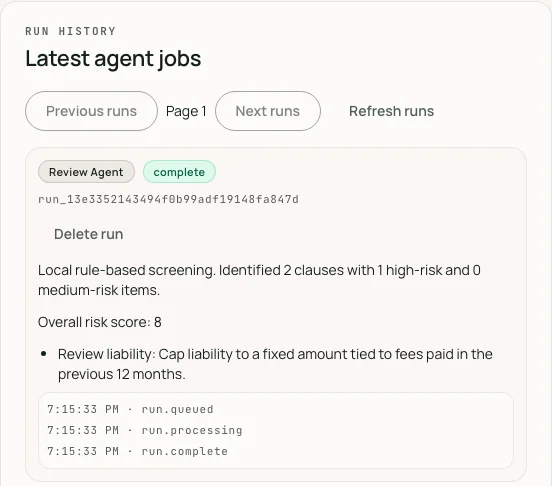
Every run is saved with its input, status and a timestamped event log. Failed runs keep their error so you can correct the input and run again.
| Status | What it means |
|---|---|
| queued | The run and its input are saved. A run.queued event is logged. |
| processing | The agent is working. A run.processing event is logged. |
| complete | The output is saved with the run and a run.complete event is logged. |
| failed | The error message is saved as the output and logged with a run.failed event, so you can see why it stopped. |
Run history shows 20 runs per page. Completed and failed runs can be deleted after confirmation; runs that are still queued or processing cannot.
Example: from review to redline suggestions
This illustrative example continues the fictitious Northwind Ltd services agreement used on the contract review page. After the review completes, you select it and start the Redline Agent. The run saves the summary "Generated 2 redline suggestions." and these entries:
| Clause type | Risk level | Suggestion |
|---|---|---|
| liability | high | Each party's aggregate liability under this Agreement shall not exceed the fees paid or payable in the twelve months before the claim arose, except for the excluded claims listed in Section 9.3. |
| auto_renewal | medium | Either party may prevent renewal by giving written notice at least 30 days before the end of the then-current term. |
Running the Review Agent on the same review would list one action, for the high-risk liability finding only. If you start either agent while the review is still processing, the run fails with "The contract review must finish successfully before running this agent."
What agents do not do
Agents are short, user-started tasks. They are a poor fit if you need:
- Background automation. Agents run only when you start them; there are no schedules, triggers or chained runs.
- Custom agents. The four agents above are the full set and cannot be configured with your own steps.
- Acting outside LegalDoc. Agents do not send email, update other systems or contact counterparties.
- Final decisions. Review and redline outputs restate review findings for a person to accept or reject.
Questions about agents
Does an agent ever export, sign or send a document?
No. The NDA Agent creates a private draft. Exports still need your version confirmation and an active subscription, and signatures are requested separately from a team workspace.
What happens if a run fails?
The run is saved with status failed and the error message, for example that the selected review has not finished. Fix the input and start a new run; failed runs are not retried automatically.
Can I delete agent history?
Yes. You can delete a completed or failed run and its history. Documents and lawyer requests the run created are kept separately.
Do agents use AI usage allowance?
The review and redline agents reuse findings from a review that already ran, and the NDA Agent fills a template from your intake. The original contract review is what uses AI allowance.
Next: see the NDA template the NDA Agent fills, ask the AI legal assistant for one-off help, check pricing or book a demo.