Feature
Legal document assembly software with guided intake
LegalDoc's legal document assembly software turns a short guided intake into a draft you can edit and review. Choose from 12 template families, each in a US, UK and Canada variant, answer the required fields, and export PDF or DOCX once you have confirmed the version you reviewed.
From template to export in five steps
A draft is created only after the required intake is complete, and an export is created only after you confirm the exact version you reviewed. Here is the sequence the builder follows.
Step 1
Choose a template and jurisdiction
Pick one of the 12 template families and its US, UK or Canada variant from the builder or the public template library.
Step 2
Complete the guided intake
Required fields are validated before a draft is created. If a value is missing or invalid, the builder names the fields to fix and no draft is saved.
Step 3
Edit the generated draft
The draft opens in an editor with an editable title and body. Changes autosave. If the same draft changed in another session, the save is refused and you are asked to reload instead of overwriting.
Step 4
Confirm the version you reviewed
Before export you tick "I have reviewed this version and resolved missing details before export." The confirmation applies to that exact saved version; any later edit needs a fresh confirmation.
Step 5
Export PDF or DOCX
With an active subscription, the export is queued and moves through queued, processing and complete (or failed with a reason). Completed files appear in the builder and in your document vault.
Example intake: a mutual NDA
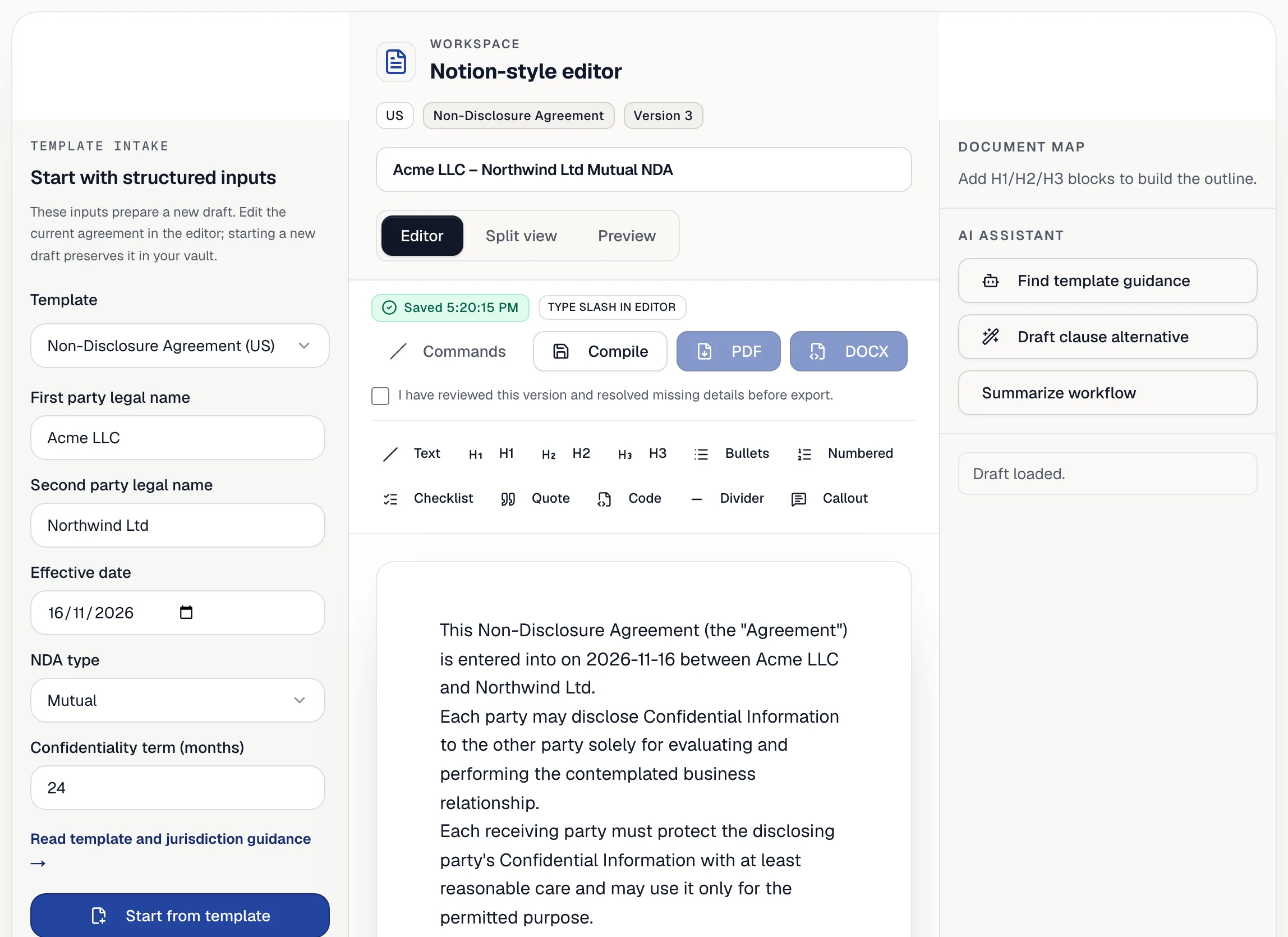
This is the actual intake for the US Non-Disclosure Agreement template. The example values are illustrative and the parties are fictitious.
| Intake field | Field type | Illustrative value |
|---|---|---|
| First party legal name | Text, required | Acme LLC |
| Second party legal name | Text, required | Northwind Ltd |
| Effective date | Date, required | A date you choose |
| NDA type | Select, required (Mutual or Unilateral) | Mutual |
| Confidentiality term (months) | Number, required | 24 |
With all five fields valid, LegalDoc creates an NDA draft between Acme LLC and Northwind Ltd using the template text and your answers. You then edit it like any other document. See the full clause text on the US NDA template page.
Template coverage
Twelve template families are available, each with a United States, United Kingdom and Canada variant, for 36 variants in total.
- Non-Disclosure Agreement
- Master Services Agreement
- Statement of Work
- Consulting Agreement
- Independent Contractor Agreement
- Employment Offer Letter
- Privacy Policy
- Website Terms of Service
- Residential Lease (Basic)
- Simple Loan Agreement
- Demand Letter (Payment)
- Service Cancellation Letter
Browse every variant in the legal template library.
Export checks and what happens when one fails
PDF and DOCX exports run only when all of these checks pass. Each failure returns a specific message so you know what to fix.
| Check | If it fails |
|---|---|
| Active subscription on your account | Export is refused with a message that a subscription is required. |
| Review confirmation ticked for the current version | Export is refused until you confirm the version. |
| Draft unchanged since you confirmed | Export is refused and you are asked to review the latest version. |
| Template placeholders resolved | Export is refused and the unresolved fields are listed by name. |
| Characters supported by the PDF font | PDF export fails with a prompt to use DOCX, which keeps the original text. |
Download links are short-lived and are refreshed when you open the export again. Past exports stay listed under each draft in the personal document vault until you delete the draft or, where scheduled deletion is enabled, its retention period ends.
Limits and when to use something else
Document assembly in LegalDoc suits repeat agreements that fit one of the existing templates. It is a poor fit if you need your own template library or heavy formatting.
- The template set is fixed: 12 families in three jurisdictions. You cannot upload your own templates or build conditional clause logic.
- Templates are starting points. Confirm with counsel that a template suits your transaction and jurisdiction before relying on it.
- Personal drafts are edited by one account. For shared editing, comments and approvals, copy a compiled draft into a team workspace.
- There is no Microsoft Word add-in. DOCX export is a one-way download.
- Exports are text documents. Branding, letterhead and custom styling are not applied.
Questions about drafting and exports
Can I create drafts without a subscription?
Yes. Guided intake, draft creation, editing and compiling are available on an account without a subscription. PDF and DOCX exports require an active subscription.
What happens to a draft after I create it?
It is saved to your personal document vault with a retention period (30 days by default) that you can change per document. You can reopen, export again or delete it from the vault.
Can the AI assistant fill in the intake for me?
The assistant can suggest a template and asks you for any missing required fields before it creates a draft. It does not create a draft from incomplete intake.
Are the templates reviewed for my jurisdiction?
Each family has a US, UK and Canada variant, but LegalDoc does not provide legal advice. Have a qualified lawyer review any document before you sign or send it.
Next: run your draft through AI contract review, check which plans include exports or book a demo to walk through one of your agreement types.